Driver Management Systems Explained for Box-Truck Fleets
Learn what driver management systems do, which modules matter, KPIs to track, and how to choose and roll one out for overnight box-truck fleets.
October 28, 2026

It's 2 AM, a dock is running late, and dispatch has to decide whether a driver can still finish the route and get back legally. If that answer lives in three tabs, a text thread, and someone's memory, you don't have a management problem you can solve with effort alone. You have a data connection problem, and that's what driver management systems are built to fix.
Why Driver Management Is More Than Dispatch
Say a box truck leaves a Twin Cities node at 11:40 PM. A dock delay pushes the first stop 40 minutes late, and the dispatcher can't tell whether the return leg still fits the driver's legal hours. The load is assigned, the truck is rolling, but the key question has no clean answer.
A driver management system is the software layer that records and connects everything about a driver's work, including qualification and training expiry dates, remaining duty hours, route requirements, and the outcome of the last run. Dispatch is only one piece of that picture.
A Route Plan Is Not Control
Think of air traffic control. A flight plan shows the route, but controllers track every aircraft's fuel, position, and clearance in real time. Dispatch gives you the plan. Driver management gives you the live status behind the plan, so you can change it before a small delay becomes a violation or a missed appointment.
That baseline isn't optional anymore. The FMCSA ELD materials note that FMCSA required most covered commercial motor vehicles to transition to electronic logging devices, with the principal compliance deadline taking effect on December 16, 2019, and enforcement of ELD-related out-of-service criteria beginning earlier, on April 1, 2018. The same source estimates ELD adoption prevents approximately 1,844 crashes annually, avoids 562 injuries per year, and saves 26 lives each year.
Electronic duty records are the minimum. They aren't a differentiator.
The same logic shows up outside trucking. The AnchOps restaurant workforce optimization guide makes a useful comparison point for any operation trying to match people, hours, and demand without burning out staff. For overnight fleets, the practical path is narrower. Get the six core modules right, watch the right KPIs, connect your systems without gaps, score vendors against overnight needs, and pilot one lane before you commit.
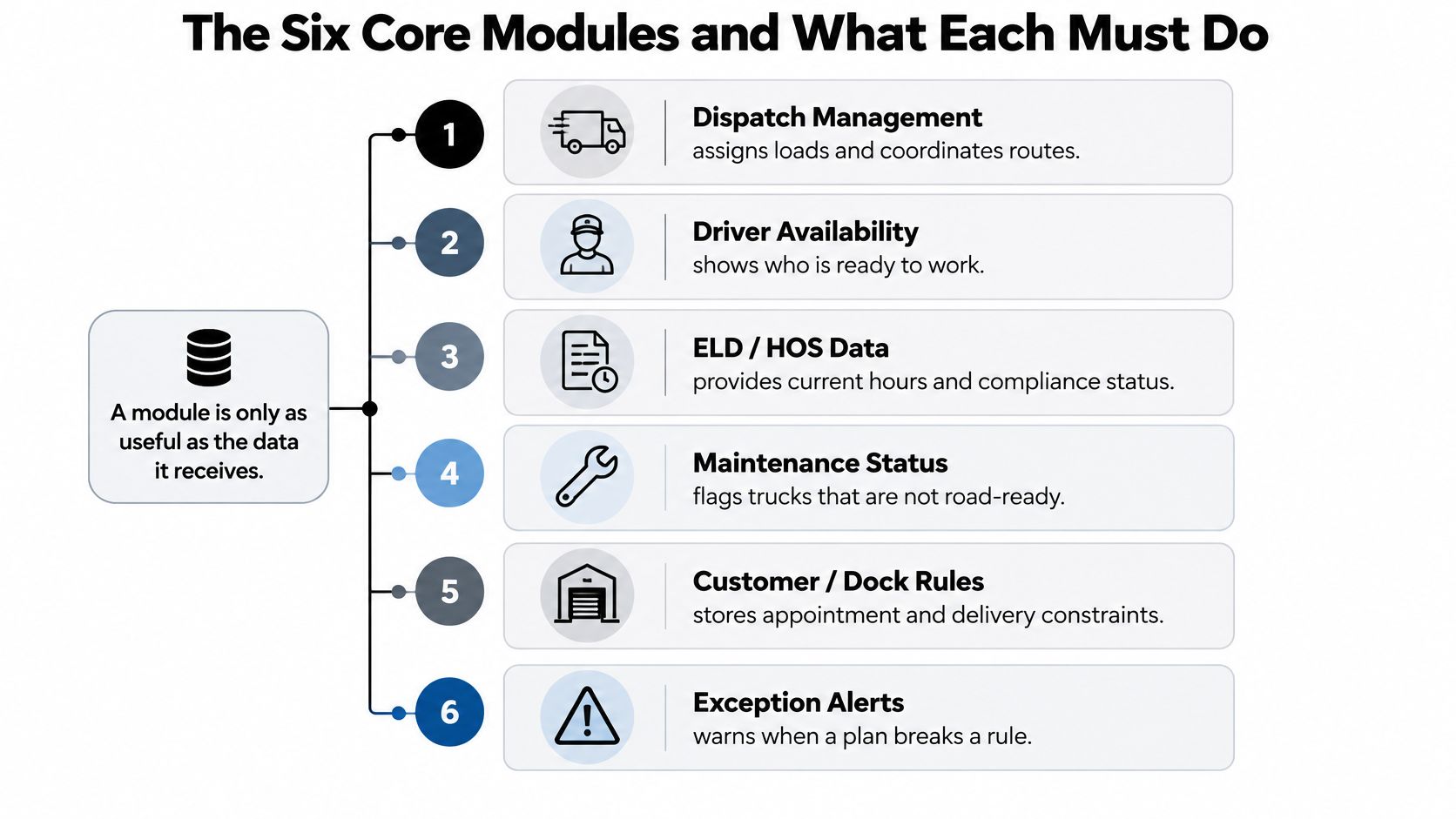
The Six Core Modules and What Each Must Do
Start with what each module owes the operation, and what feeds it.
| Module | What It Must Do | Typical Data Source |
|---|---|---|
| Dispatching | Assigns routes, sends changes, records driver acceptance and timestamps | TMS load data, dispatcher actions, driver app confirmations |
| ELD and hours-of-service integration | Shows available driving and on-duty time before assignment | ELD duty-status records and edit history |
| Training and performance tracking | Tracks certifications, expiry dates, coaching and scorecards | LMS records, safety events, route history |
| Safety and compliance | Stores inspections, incidents, corrective actions and policy acknowledgments | Roadside inspection data, incident reports, maintenance logs |
| Route optimization | Sequences stops and sets realistic dwell and return time | Stop locations, historic dock times, road speed data |
| Payroll and HCM integration | Exports paid hours, paid waiting and overtime to payroll | Dispatch times, ELD hours, timekeeping approvals |
Read the third column as seriously as the first. A module is only as useful as the data it receives, and most failures I see in evaluations trace back to a feed nobody owned.
How the Dependencies Run
ELD and hours-of-service integration comes first in practice, even if dispatch feels like the center. It supplies the duty-status data that tells dispatch whether an assignment is legal. Dispatching then assigns routes, pushes changes, and records driver acceptance with timestamps, so there's no argument later about who agreed to what and when.
Training and performance tracking attaches certification expiry dates and coaching records to each driver. Safety and compliance holds inspections, incident reports, and corrective actions in one place. Route optimization sequences stops and builds in realistic dwell time instead of fantasy dock turns. Payroll and HCM integration exports paid hours, including paid waiting time, into the payroll run.
Two failures show why the links matter:
- Dispatch without ELD data: Routes get assigned on mileage alone, and nobody sees the duty window closing until the driver is already out.
- Payroll without dwell time: Drivers get underpaid for waiting, trust drops, and every pay dispute becomes a manual reconstruction.
For an overnight box-truck fleet, I'd treat four features as the minimum. You need exception alerts, edit audit trails, driver acceptance records, and exportable records you can pull without begging a vendor portal. If a platform can't do those four things cleanly, the rest of the feature list doesn't matter much.
How ELD Data Turns Into Dispatch Decisions
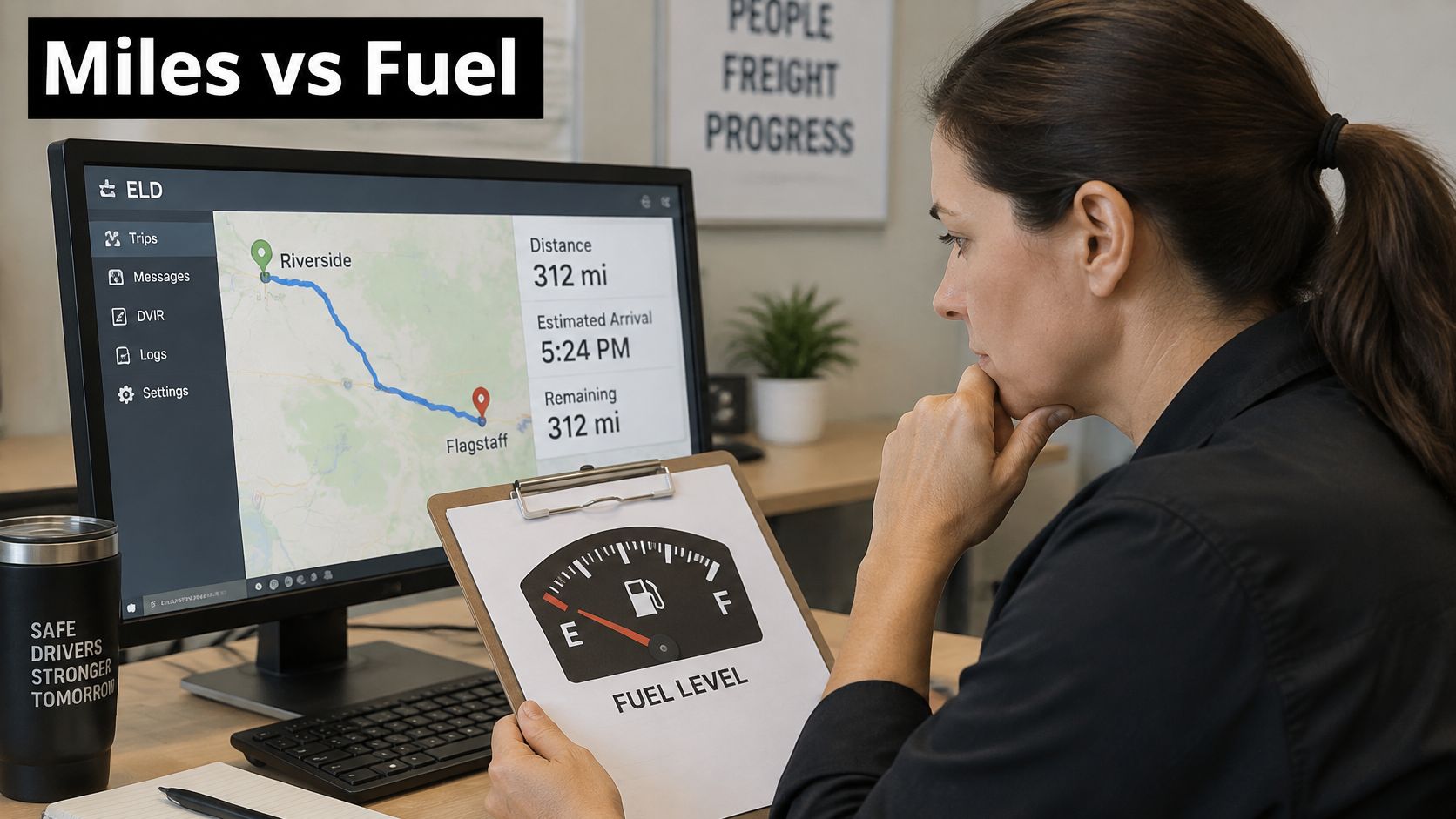
Before dispatch commits an overnight route, it needs to know whether the driver has enough time to complete it. Mileage alone cannot answer that. ELD duty-status data shows the remaining time, while the route plan shows how much the assignment is likely to use.
The image below captures the habit to build: check the available range against the plan before assigning the work.
A Worked Example
A driver has 4 hours 20 minutes of driving time left. The route requires 3 hours 50 minutes of driving to the far stop, 45 minutes waiting at the dock, then a 1 hour 10 minute drive back to base.
The driving legs total 5 hours, which exceeds the available 4 hours 20 minutes. Dock wait does not use driving time, but it does consume on-duty time. Before assigning the route, dispatch must also check that the full schedule fits within the applicable limits. The FMCSA hours-of-service regulations set an 11-hour driving limit within a 14-hour on-duty window.
This assignment does not fit as planned. Reshape the route, split it, or assign it to another driver before departure. That early decision turns ELD records into a dispatch control, rather than paperwork reviewed after a schedule has failed.
Practical rule: Assign by available duty window, not planned mileage.
ELD data is useful when it stays connected to the decisions that consume a driver's time. The FMCSA federal register document on electronic hours-of-service recorders describes research comparing trucks with and without electronic records, using carrier-collected crash and hours-of-service violation data under real-world operating conditions. For dispatch, the practical value is a continuous view of duty status that can be checked against the assignment.
The Controls That Make It Real
- Confirm available hours before departure: Hold the assignment until both driving and on-duty time allow it.
- Alert inside a set buffer: Flag a projected limit early enough for dispatch to change the plan.
- Keep an immutable audit trail: Record who changed each log entry and preserve its original value.
- Separate the clocks on the dashboard: Show driving, on-duty, and off-duty time distinctly, so dispatch can see which limit affects the plan.
The short video below is worth watching with these controls in mind, particularly how projected time can be reviewed before a driver leaves.
Do not use an ELD as a standalone timekeeping tool. Connect it to dispatch and route planning so managers can spot time constraints early and examine why plans keep slipping. Repeated overruns may point to detention, long dwell, or unstable schedules, not a driver who needs a lower score. Fair decisions depend on separating those operating causes from a driver's actions.
Fatigue and Safety Scoring Beyond Hours-of-Service
A schedule can be legal and still exhausting. That's the gap most scorecards miss.
Compliance data answers whether a driver may continue. Fatigue-risk data answers whether continuing is prudent. On overnight lanes, you need both layers, because night work, short recovery, and circadian disruption stack up even when every log looks clean.
The stakes aren't abstract. NHTSA's drowsy driving countermeasures guidance reports that approximately 14% of truck drivers in a cited survey reported a near-crash caused by drowsiness, while 66% of drivers who had nodded off reported getting six or fewer hours of sleep the previous night. Separate NHTSA surveillance estimates in the same source place drowsiness as a contributing factor in 8.8% to 9.5% of examined crashes.
Signals Worth Combining
- ELD duty history: Shows cumulative load across the week, not just tonight.
- Shift timing and consecutive overnights: Flags repeated night work with thin recovery.
- Unplanned dwell: Long, unpaid-feeling waits at 3 AM drain alertness and patience.
- Safety events by hour of the night: Hard braking or lane deviation clustered at certain hours tells a story a daily total hides.
- Driver-reported fatigue check: A short check at shift start gives drivers a legitimate way to raise a hand.
Say a driver is on a third consecutive overnight shift and takes a 90-minute unplanned dwell. That combination should trigger a dispatch review and a protected rest window before the next run. Our deeper breakdown of building a fatigue review process for overnight fleets walks through how to structure that escalation.
Recovery quality matters off the clock too. For drivers trying to sleep during the day, practical background on sleep loss and heart health from SleepHabits is a reasonable resource to share during training, without turning dispatch into a medical office.
Trust Decides Whether Scoring Works
Publish a plain-language privacy policy that states who can view footage, how long data is kept, and whether audio is recorded. Keep coaching thresholds separate from discipline thresholds, require manager review before any adverse action, and let drivers challenge an incorrect event.
Adoption depends on proving the data can clear drivers as well as flag them. If the first time a driver sees their own data is in a disciplinary meeting, you've already lost the room.
Connecting TMS, WMS and Telematics Without Gaps
An overnight box truck arrives late, but the driver's score alone cannot explain why. The delay may begin with a changed appointment, a long dock wait, or an unstable schedule. Connect the systems that record each handoff so dispatch can identify the operational cause and respond fairly.
| System | Data It Should Send | What Breaks Without It | Minimum Requirement |
|---|---|---|---|
| TMS | Appointment windows, load assignments, planned stop sequence | Planned and actual times cannot be compared | Appointment time and stop order for each load |
| WMS | Dock check-in and check-out, dwell, loading status | Detention and delay causes stay unexplained | Timestamped dock events for every stop |
| Telematics | GPS position, speed, engine and safety events | Late arrivals and events lack context | Event-level data with timestamps |
| ELD | Duty status, available hours, edit history | Dispatch assigns routes without knowing legal hours | Real-time duty status with edit history |
| Payroll and HCM | Approved hours, paid waiting, overtime | Pay disputes and manual corrections | Daily export of approved hours |
Build in This Order
- Connect ELD to dispatch first, so route assignments reflect legal hours.
- Add the TMS appointment feed to compare planned and actual times.
- Add WMS dock check-in and check-out timestamps to measure dwell and identify facility delays.
- Add telematics to put location and safety events in context.
Detention remains difficult to measure when appointment, arrival, dock, and departure records are incomplete or inconsistent. A driver score cannot explain a long wait without those timestamps. Focus analysis on the conditions behind the result: Which operational conditions produced the score? That question can reveal whether a delay came from a facility, a schedule change, or driving behavior, rather than treating every late arrival as a driver problem.
For the warehouse connection, use how to scope warehouse integrations to clarify which events need to pass between systems. The guide to aligning integration across the supply chain can help frame the carrier-side handoffs. Keep ownership clear: warehouse records should capture dock events, while dispatch needs those events alongside appointments and driver status.
Technical Checks Before You Sign
- Require event-level timestamps, not daily summaries, so each stop can be reconstructed.
- Confirm all systems use Central Time for Twin Cities lanes; inconsistent time zones can make an otherwise complete timeline misleading.
- Check whether exports run by API or scheduled file drop and confirm the receiving system can use the format.
- Test what happens when a feed goes silent overnight. The system should make missing data visible, rather than presenting an incomplete timeline as a complete record.
Integration takes work to maintain. A deeper connection can improve the explanation for delays, but it also creates more dependencies when a feed fails or timestamps do not line up. Start with the events dispatch needs to make a fair decision, then add feeds that clarify the remaining causes.
KPIs That Show Whether the System Works
A useful dashboard separates driver performance from operating conditions. Track whether routes meet appointment windows, whether schedules leave room for legal rest, and whether dispatch decisions are fair to the people driving overnight.
| KPI | How to Calculate | Why It Matters Overnight | Review Cadence |
|---|---|---|---|
| On-time arrival rate | Arrivals inside the appointment window divided by total stops | Tracks service performance on middle-mile lanes | Weekly |
| Detention minutes per stop | Paid waiting beyond the free dwell allowance | Separates facility delay from driver performance | Weekly |
| Unplanned overtime hours | Hours beyond scheduled shift length | Highlights schedule instability and fatigue exposure | Weekly |
| Dead-mile percentage | Empty miles divided by total miles | Reveals routing inefficiency | Monthly |
| Coaching closure time | Days from flagged event to documented coaching | Shows whether flagged events lead to action | Monthly |
| Fatigue-triggered dispatch reviews | Reviews divided by overnight shifts | Tracks how often fatigue signals affect assignments | Weekly |
Set the review cadence according to urgency. Check exceptions daily, review on-time arrival and detention weekly, and assess scorecards and turnover monthly. The guide to choosing performance indicators that hold up in operations explains how to pair each metric with an owner.
The Fairness and Privacy Pitfall
A late-arrival metric without dwell, dispatch-change, or detention timestamps can label a reliable driver as a poor performer. It may also pressure drivers to recover time unsafely to protect a score shaped by conditions outside their control. Review the event sequence alongside the score, including whether a facility delay or dispatch change affected the appointment.
Privacy needs clear rules, too. Drivers and fleet managers often raise concerns about consent, third-party sharing, and data security. Set out what information the system collects, who can access it, how it may be shared, and how drivers can question a score. Human review and accountability matter when software influences an assignment or a performance decision. Data is more useful when drivers can see how it is being used and challenge missing context.
Baseline Before Targets
Record a 30 to 60 day baseline before setting targets. Targets based on guesses create false alarms, and repeated false alarms teach dispatch and drivers to ignore the dashboard. Use the baseline to identify where results vary by route, stop, or operating condition before deciding what performance should look like.
The FMCSA Safety Measurement System FAQ says SMS evaluates 24 months of performance information from roadside inspections and crash reports across seven Behavior Analysis and Safety Improvement Categories, and FMCSA updates SMS monthly. Use a monthly review for internal KPI trends as well, while keeping daily exceptions and weekly service measures on their faster cadences.
Treat each KPI as a trend, and move to the next metric only after the one above it is stable.
Scoring Vendors Against Overnight Box-Truck Needs
Score vendors against overnight reality, not a daytime demo script.
| Criterion | What to Verify | Red Flag |
|---|---|---|
| ELD and HOS certification | Certified ELD hardware or app and compliant duty logs | Vendor cannot show certification documentation |
| Exception alerts | Projected violations and missed check-ins reach dispatch in real time | Alerts appear only in next-day reports |
| Audit trail | Every edit recorded with user, time and original value | Edits overwrite earlier records |
| Integration and export | API or scheduled file exports for TMS, WMS and payroll | Data locked inside the vendor's own portal |
| Driver app | Works on phones, supports offline entry, short task screens | Basic tasks require a desktop |
| Privacy controls | Role-based access, retention limits and audio settings documented | No written privacy policy or access logs |
| Coaching workflow | Coaching thresholds kept separate from discipline thresholds | Scores trigger discipline automatically |
| Overnight support | Support coverage across overnight hours in Central Time | Support available only during weekday business hours |
| Implementation timeline | Phased rollout with named milestones and a training plan | Go-live promised within days with no pilot |
Score each vendor one to five on every criterion. Weight ELD and hours-of-service certification and the audit trail highest, because they carry legal exposure. Then require a live demo built on one of your real overnight routes, not a generic sample dataset.
Questions to Ask in the Room
- Certified feed: Does the ELD feed come from a certified device?
- 3 AM alerts: Can exception alerts reach the dispatcher's phone at 3 AM?
- Open export: Can every record be exported in an open format?
- Data ownership: Who owns driver data, and how long is it kept?
- Overnight support: Does support cover overnight hours in Central Time?
- Real timeline: What is the realistic implementation timeline, with training?
On pricing, vendors typically charge per vehicle, per driver, or per module. Run a full-year comparison. For example, 30 trucks at 45 dollars per vehicle per month is 16,200 dollars per year in subscription fees. Add integration build hours and driver training hours at internal rates before comparing bids, because those costs often exceed the subscription in year one.
Finish with references. Ask for two fleets running overnight schedules of similar size, and ask what broke in their first 90 days. Operators like Peak Transport, running structured overnight box-truck dispatch in the Twin Cities, are the kind of reference profile you want, because their constraints match yours.
Pilot One Overnight Lane Before Committing
Don't switch the whole fleet at once. Pilot one stable lane, such as a Twin Cities node pair with a consistent overnight schedule and known dock times, and prove the system there.
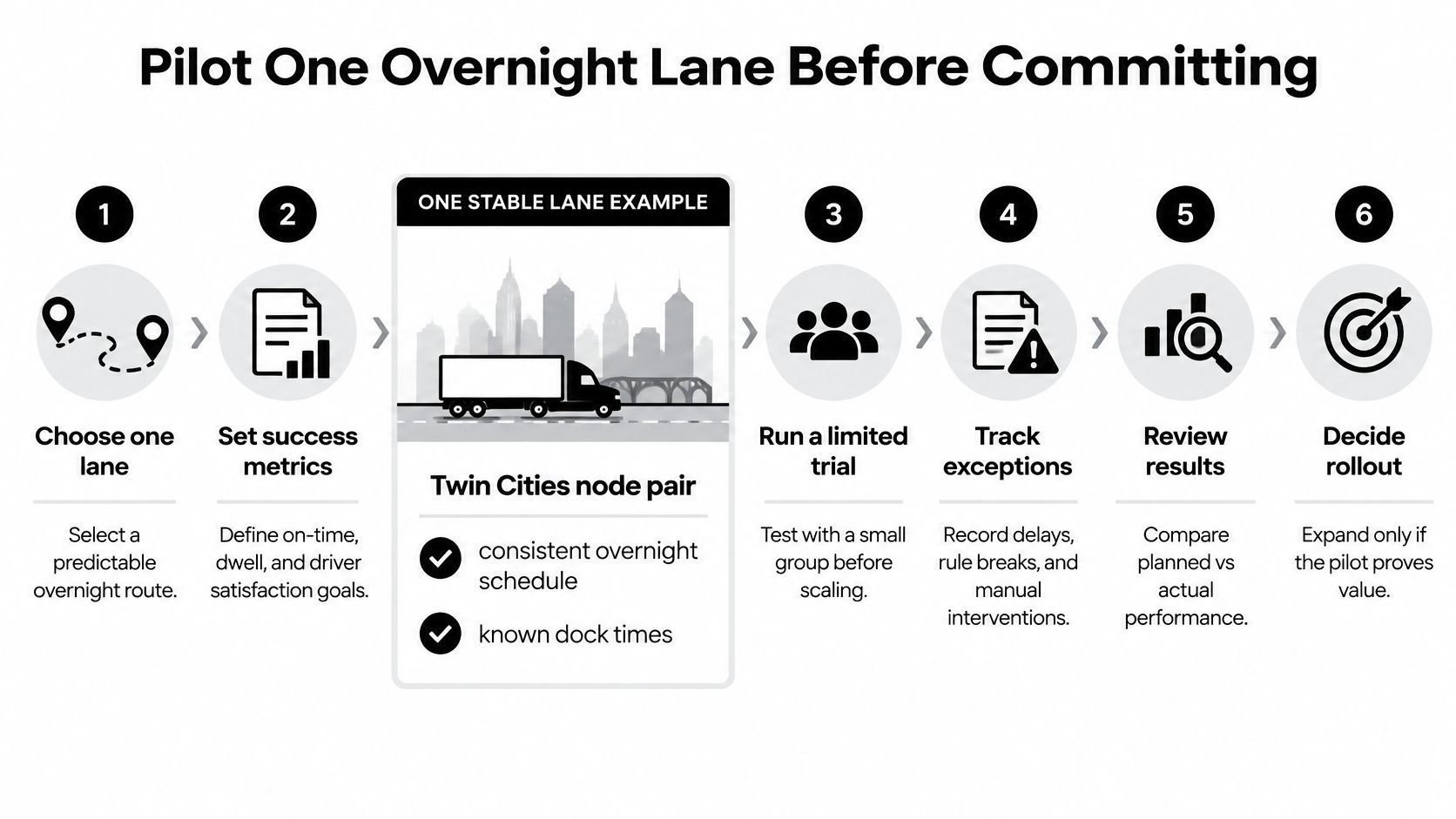
Six Steps That Keep the Pilot Honest
- Pick one lane with a stable schedule and known dock times.
- Record 30 days of baseline KPIs before changing anything.
- Connect ELD and dispatch first, then add the TMS appointment feed.
- Train drivers on the app, the privacy policy, and how to challenge an event.
- Run the pilot for 60 days with a weekly review of exceptions, detention, and fairness signals.
- Expand lane by lane only after on-time arrival, hours-of-service exceptions, and 90-day turnover hold steady.
Change management carries as much weight as configuration. Name a driver champion on each shift who can answer questions at 2 AM without calling a manager. Publish which data is used for coaching versus discipline, in writing, before the first event is flagged.
Share early wins out loud. When a detention record clears a driver who would otherwise own a late arrival, say so in the next shift briefing. That's the moment the system stops feeling like surveillance and starts feeling like protection.
Judge pilot results against the recorded baseline, not an assumed target.
For an operation running overnight box-truck routes out of the Twin Cities, one lane gives a clean before-and-after comparison. You get real dock behavior, real driver feedback, and real exception volume, without betting the whole network on a vendor's promises. I'd rather learn hard lessons on one lane in 60 days than relearn them fleet-wide for a year.
Peak Transport runs overnight middle-mile box-truck routes across the Twin Cities with W-2 drivers, structured dispatch, and data-informed route planning built around legal hours and on-time performance. If you're evaluating driver management systems and want a carrier partner that already operates this way, or you're a driver who wants consistent overnight work with clear expectations, visit Peak Transport to see current routes and openings.