How to Improve Operational Efficiency: A Middle-Mile Guide
Learn how to improve operational efficiency in middle-mile trucking: diagnose delays, set KPIs, optimize routes, and manage drivers with a clear roadmap.
October 31, 2026
Cutting cost per mile is the most popular advice on how to improve operational efficiency, and it's the fastest way to make a middle-mile network worse. A cheaper mile that arrives late, burns driver hours at a gate, or creates a missed scan isn't efficient. It's just cheaper on one line of a spreadsheet.
I would measure efficiency differently. Judge every route on on-time performance, safety, and driver hours together, and build a clean data layer before you buy another tool. That sequence sounds slower. In practice, it's what stops dispatch from fixing the same late departure every morning.
Scorecard Metrics and How to Calculate Them
Start with a scorecard a dispatcher can check every morning before release. It needs eight metrics, each with one plain formula so two people calculate it the same way every time.
If you want to see how other operators frame this kind of balanced view, you can compare frameworks with The OKR Hub. Our own guide to operational efficiency metrics covers how we apply the same thinking to overnight lanes.
Overnight route scorecard with formulas and review cadence
| Metric | How to calculate | Review cadence |
|---|---|---|
| On-time departure | Routes leaving within the planned window ÷ total routes | Daily |
| On-time arrival | Routes arriving within the appointment window ÷ total routes | Daily |
| Detention minutes | Minutes waiting at a facility beyond the free-time allowance | Daily |
| Empty miles | Miles without freight ÷ total miles | Weekly |
| Paid vs productive hours | Productive driving and handling hours ÷ total paid hours | Weekly |
| Documentation accuracy | Trips with complete scans and proof of delivery ÷ total trips | Weekly |
| Preventable crash rate | Preventable crashes per million miles | Monthly |
| HOS violations | HOS violations per 1,000 driver-days | Monthly |
Treat this table as a baseline, not a target sheet. Record four to six weeks of data before you set any number, because a target built on guesses is one nobody on the floor will believe.
The cadence follows how fast you can act. Daily metrics drive tonight's dispatch decisions. Weekly metrics show patterns in miles, hours, and paperwork. Monthly metrics cover safety and hours of service, where a single week is too noisy to judge fairly.
Pick five metrics for your first pilot. Tracking all eight from day one usually means tracking none of them well.
Choose the five closest to the problem you already see, lock the formulas, and don't change definitions mid-baseline. Consistency beats sophistication at this stage.
Pick Technology That Feeds Real Dispatch Decisions
Buying technology doesn't improve operations by itself. It often adds screens while dispatch keeps running on phone calls.
A look at a manager reconciling system data with paper records shows where that gap usually sits.

Recent PwC research on digital supply chain investments found that 92% of operations and supply-chain leaders identified at least one reason technology investments had not delivered expected results, while 83% identified two or more. Integration complexity was cited by 47% and data problems by 44%.
Build the data layer first
Before you buy, standardize six fields across every lane. You need standardized route identifiers, arrival and departure timestamps, detention codes, exception reasons, proof-of-delivery records, and driver-hour impacts. Without those, a new platform just moves disconnected data faster.
Data sources for middle-mile efficiency and the decisions they support
| Data source | What it shows | Decision it supports |
|---|---|---|
| Transportation management system | Order status, route assignments and appointment times | Route sequencing and load assignment |
| ELD and telematics | Miles, duty status, HOS exceptions and inspection events | Dispatch gate release and fatigue risk |
| Route modeling | Expected miles and drive times for each lane sequence | Pre-dispatch route design |
| Proof-of-delivery and scan records | Delivery timestamps and handoff failures | Documentation accuracy and root-cause analysis |
| Driver exception log | Time lost to gate waits and unclear instructions | Standard-work updates |
Each tool must remove a manual step. If it creates duplicate entry, unreliable alerts, or extra driver workload, it'll reduce efficiency even if the dashboard looks impressive. Our notes on dispatch system software set out what to check before connecting systems.
This short video walks through how dispatch decisions change when the underlying data is trustworthy.
Follow a tight sequence. Define the decision to improve, verify data quality on one lane or facility pair, pilot the integration, and scale only after on-time performance and safety stay stable.
Practical rule: If a tool doesn't change a dispatch decision within two weeks, stop paying for it.
Diagnose Where Time and Miles Disappear
The most expensive symptom is usually mundane. Routes leave a little late, wait a little long at one hub, and drivers absorb the lost time until hours run short near the end of the shift.
Time every stage for one week
Map the overnight process in the order it runs. Time pre-trip inspection, loading, departure, hub handoff, delivery, and closeout by lane and facility. Record dwell, queue time, missed scans, and handoff failures next to each stage.
Electronic log data supplies most of these numbers. Capture vehicle miles, duty status, arrival and departure timestamps, HOS exceptions, and inspection events, then treat that feed as an operations sensor, not a compliance archive.
The safety case supports that habit. FMCSA's controlled analysis, published in the Federal Register notice on electronic logging devices, found trucks using electronic hours-of-service recorders had an 11.7% lower total crash rate and a 5.1% lower preventable-crash rate than comparable trucks without them.
Common efficiency symptoms, likely causes and first checks
| Symptom | Likely cause | First check |
|---|---|---|
| Routes depart late most mornings | Loading readiness or late dispatch release | First pallet loaded time vs release time |
| Long waits at one hub | Gate or dock congestion at that node | Detention minutes by facility and hour |
| High empty miles on one lane | Unbalanced backhaul or fixed route design | Loaded vs empty miles per lane |
| Repeated missed scans | Handoff step unclear or scanner training gap | Missed scan count by driver and shift |
| Overtime on early shifts | Route built past driver hour limits | Duty-hour projection at dispatch |
| Repeated breakdowns on one unit | Maintenance gaps | Inspection defect reports per vehicle |
Label every exception
Run a daily exception review before dispatch. Give each exception one label and one owner:
- Planning: Route design or appointment buffers are wrong.
- Execution: Loading sequence or handoff steps failed.
- Equipment: A vehicle or device needs maintenance.
- Driver training: A skill or instruction is missing.
That label tells you where to spend money. A planning problem won't be solved by coaching drivers harder, and a training gap won't be solved by buying software. The same discipline applies when you scope outside help for a driver-facing tool, which is why it's worth checking mobile hiring advice from Continuum Solutions before you commission an app your data can't yet support.
Fix the one constraint with the largest recurring cost first. Don't touch three lanes, two docks, and a training program at once, or you won't know what worked.
Daily Exception Review Template
A review without a log turns into a conversation nobody can audit. Use a simple record your team completes before every dispatch.
Six fields for every entry
Record date, route ID, the exception in one line with its measured value, the label, the owner, and the root-cause fix to carry into the next route plan. Keep the exception measurable. "Late at the hub" isn't enough. "Waited 48 minutes beyond free time" is.
Daily exception review log template with illustrative entries
| Date | Exception | Label | Owner | Root-cause fix in next plan |
|---|---|---|---|---|
| Mon | Departure 40 minutes after planned window | Execution | Dock lead | Resequence loading before release |
| Tue | Arrival 35 minutes after appointment window | Planning | Route planner | Add measured dwell buffer for that node |
| Wed | Duty-hour projection short by 90 min | Planning | Dispatcher | Move final stop to next shift |
| Thu | Brake defect found at pre-trip | Equipment | Maintenance lead | Swap unit before release |
| Fri | Three missed scans at stop 4 | Driver training | Trainer | Scanner refresher and handoff checklist |
Run it in 15 minutes
Read the overnight exceptions first. Then assign each one a label and an owner, run the first check, and write the fix in the log before you move to tonight's releases.
Three rules keep the log honest:
- No label, not closed: An exception without a label stays open.
- Date every fix: A fix that changes a route plan must be applied to the next release.
- Escalate repeats: The same exception on the same route in three days goes to the weekly audit.
At the end of each week, count exceptions by label and lane. If planning dominates, your route design needs work. If training dominates, your standard work isn't reaching drivers. That trend tells you where the next change belongs.
Build Standard Work Through a One-Lane Pilot
Standard work fails when managers write it in an office and launch it everywhere. Build it on one lane, at night, under real conditions.
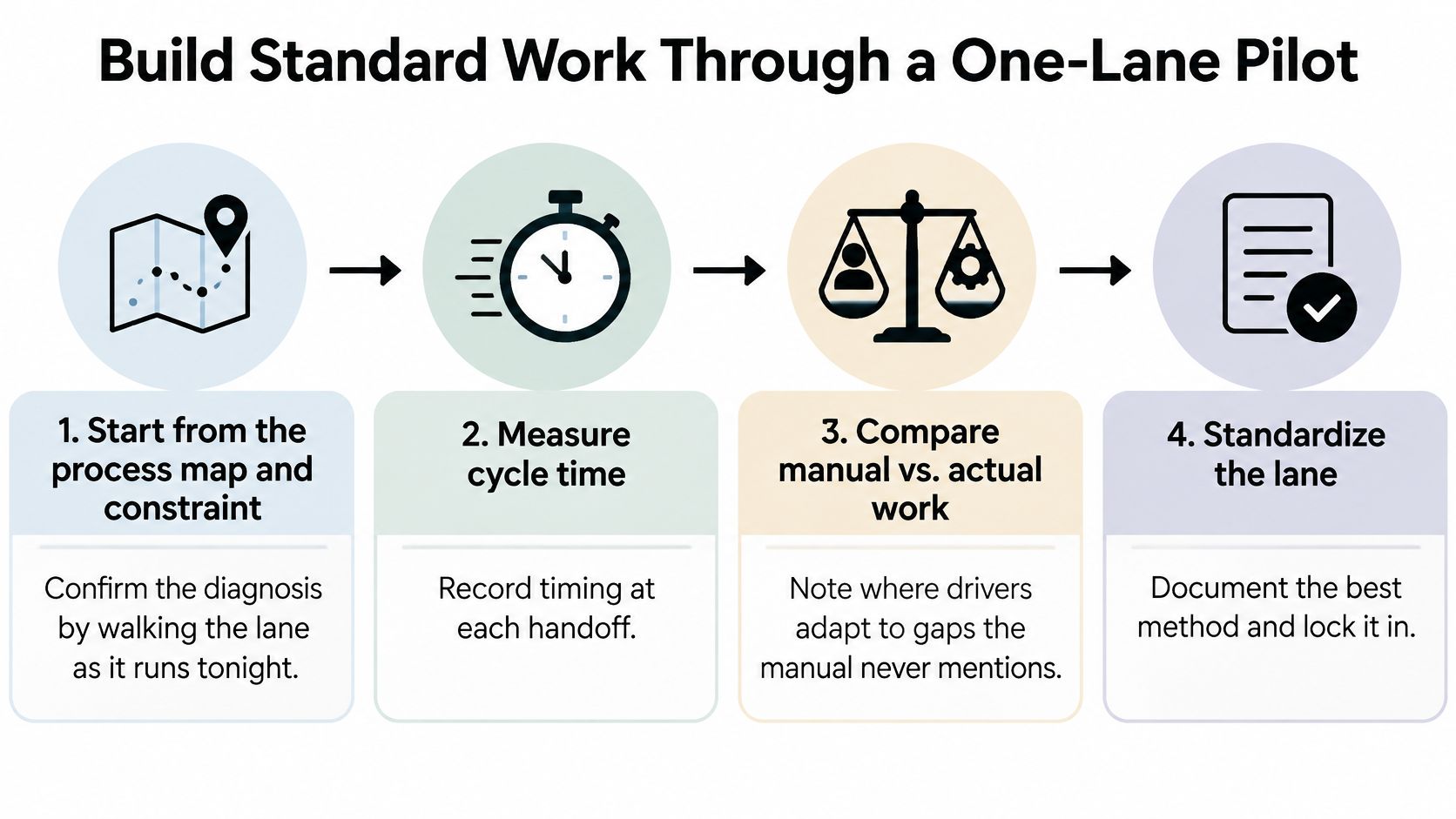
The infographic below summarizes the pilot sequence before the detailed steps.
Seven steps for one lane
- Start from the process map and constraint. Confirm both by walking the lane as it runs tonight, because drivers adapt to gaps the manual never mentions. Write down those adaptations before you judge them.
- Measure the pilot lane only. Record cycle time, queue time, dwell, documentation defects, missed scans, empty miles, and handoff failures. This becomes your baseline for comparison.
- Identify the constraint from observed data. It may be a recurring gate delay at one node, the loading sequence, or a documentation step. Don't pick it from whichever complaint was loudest that week.
- Write one best-known method. Include route instructions, escalation thresholds, a short checklist, and dispatch message templates. Keep each instruction executable in a dark yard, not just readable at a desk.
- Pilot the change on that single lane. Run it long enough to compare results against your Step 2 baseline. Change one thing at a time so the result means something.
- Audit weekly and update the standard. Check the lane against the method, then revise it when conditions change, such as a new gate schedule. A standard nobody updates becomes fiction.
- Copy it to a second lane only after it holds. Scaling an unproven method multiplies rework. Scaling a proven one multiplies the gain.
Why the constraint matters more than utilization
A NIST lean implementation case raised daily output from 75 to 120 units while reducing work-in-process from 717 to 156 pieces through one-piece flow and bottleneck management. That's manufacturing, not trucking, but the principle transfers directly. Control flow at the constraint instead of pushing truck utilization higher and worsening terminal congestion.
Watch for predictable slips. A late start pushes every later step into the peak. A skipped step in a sequence overloads the next run. Procedures written for daylight fail at night when staffing, lighting, and gate support are thinner.
Separate controllable causes, such as dispatch timing, loading readiness, and communication, from external causes such as weather or facility closures. Drivers shouldn't be blamed for delays they can't control, and your pilot data shouldn't mix the two.
Don't launch multiple process changes at once. You'll get activity, not evidence.
Tune Routes, Schedules and Dispatch Gates
Chasing the lowest mileage number is a costly habit. Say a route saves twelve miles but reaches a dock thirty minutes after its appointment window. You've bought detention, a missed handoff, and a driver who starts the next run late.
Model routes against time, not just distance
Test lane sequences with route modeling against appointment windows, driver hour limits, and realistic dwell times. Then compare your best three options by on-time arrival and paid hours, not miles alone. Our overview of route optimization benefits explains how that comparison changes design choices.
Set loading and handoff buffers from your own detention data. If one node consistently holds drivers beyond free time, the buffer belongs in the plan, not in a driver's unpaid patience or a dispatcher's apology call.
Install three hard dispatch gates
- Verified duty-hour availability: No release if the projected route exceeds available hours.
- Documented fuel and break locations: The driver shouldn't improvise either one mid-route.
- Escalation rule: If projected arrival threatens the service window, dispatch acts before departure, not after the miss.
These gates feel restrictive for about a week. Then they start preventing the late arrivals everyone used to explain after the fact.
Build schedules a driver can keep for weeks, not a single night that looks good on a map. Consistency matters operationally, not just personally. At Peak Transport, specific shift times may vary by route, and we review shift options with applicants during the hiring process, so expectations are set before a driver takes a lane.
A gate that stops two bad departures a week is worth more than an optimized route that adds one late arrival every night.
Don't soften a gate because freight is waiting. The gate exists for exactly that moment, when pressure makes a bad release look reasonable.
Protect Driver Hours, Safety and Training
Faster routes and tighter utilization can raise throughput while increasing fatigue, turnover, and compliance risk. That trade-off is where many efficiency programs lose their gains.
The labor context makes it expensive to ignore. An industry outlook published by Infosys reported that 76% of surveyed North American and European logistics organizations faced significant logistics or supply-chain workforce shortages. When drivers are hard to replace, an hour lost to turnover or retraining costs more than a route sheet shows.
Walk the shift step by step
Box truck drivers at Peak Transport load and unload with pallet jacks, document deliveries, and perform pre- and post-trip inspections. Each step has a failure cost:
- Pallet jack check skipped: Loading slows while someone finds working equipment.
- Delivery record incomplete: Dispatch and the receiving team redo work to prove the handoff.
- Inspection rushed: A defect surfaces mid-route and can ground the unit.
None of those losses appears as a training problem on a mileage report. All of them consume paid hours.
Treat training and predictability as levers
We provide paid training on safety standards, routes, equipment such as pallet jacks, and company procedures. That's where new drivers learn the standard work, so training is an efficiency tool, not overhead you trim when volume rises.
Automation doesn't change that logic. It can raise productivity while also increasing training requirements, so efficiency gains aren't purely labor elimination.
Predictability is the second lever. Give drivers stable schedules they can plan around, realistic buffers, and clear escalation rules for when a route runs late. A driver who knows exactly what to do at a delayed gate makes a faster, safer decision than one waiting for instructions.
Close every proposal with a four-outcome test. It must hold together on on-time performance, safety and compliance, driver retention, and total cost per completed movement. If it improves one by damaging another, redesign it.
Start Your Efficiency Roadmap on One Lane
Don't rebuild the network. Run four phases on one lane, with an exit check you must pass before moving on.
The roadmap below lays out the phases and their exit checks.
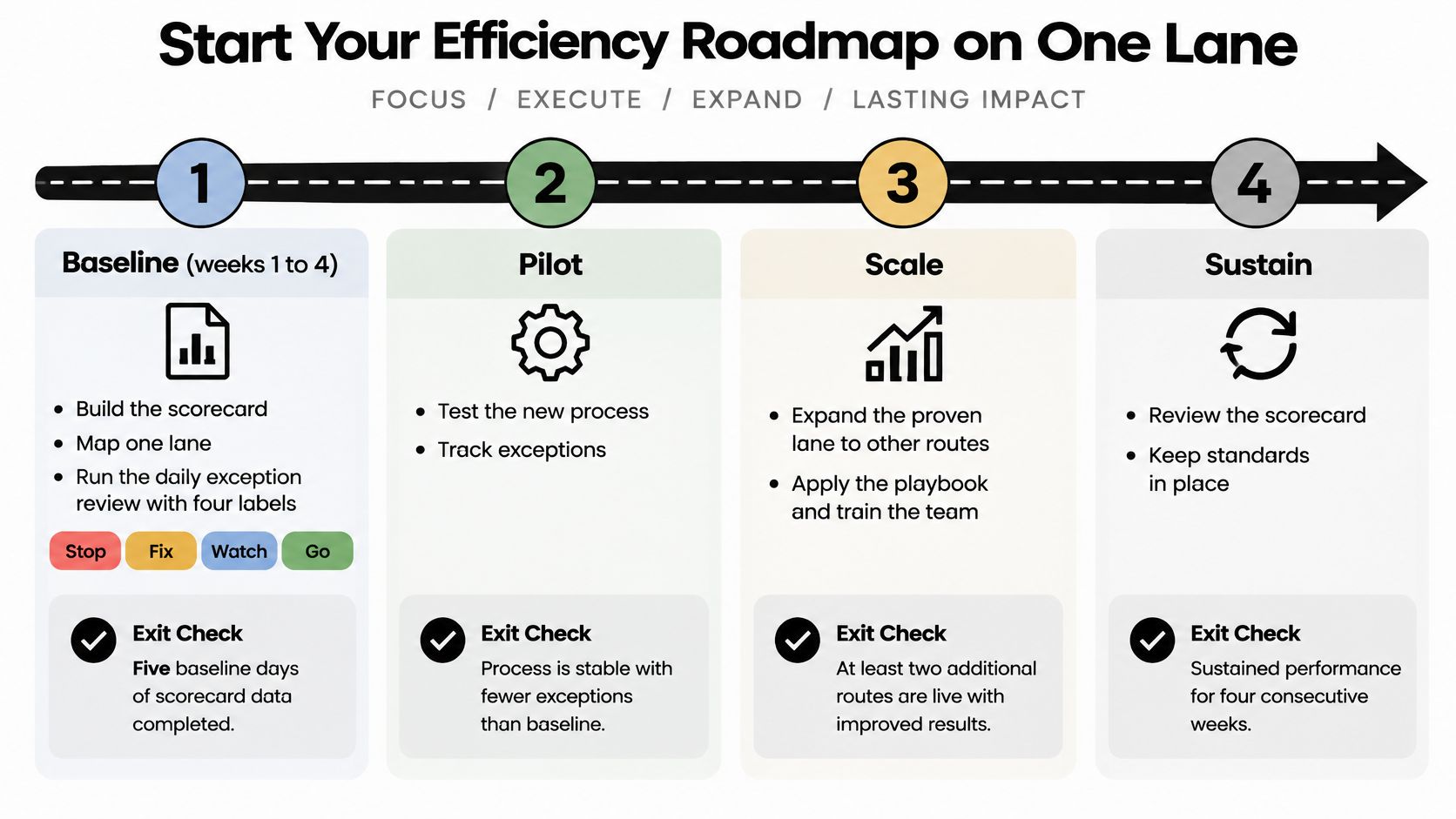
Four phases with exit checks
- Baseline, weeks 1 to 4: Build the scorecard, map one lane, and run the daily exception review with its four labels. Exit only when five metrics are recorded with agreed formulas.
- Pilot, weeks 5 to 10: Apply the seven-step standard work to that lane, audit it weekly, and update the standard as conditions change. Exit only when on-time performance and documentation improve with no drop in safety results.
- Scale, weeks 11 to 16: Add a second lane or facility pair, install dispatch gates, and connect the one data source the pilot proved useful. Exit after four stable weeks on both lanes.
- Sustain, ongoing: Review the scorecard monthly, retire any metric nobody acts on, and rerun the diagnosis each quarter.
This sequence protects the people doing the work while the process changes around them. Peak Transport offers drivers 401(k) with matching, health insurance, paid sick time, paid training, and growth opportunities, which supports the retention this roadmap depends on. Our application takes less than 5 minutes to complete.
Start tonight, not next quarter. Pick one lane, choose five metrics from the scorecard, and schedule the baseline review for the next dispatch cycle. That single decision turns How to Improve Operational Efficiency from a slogan into a measurable operating routine.
If your freight needs middle-mile execution built on measured routes, protected driver hours, and disciplined dispatch, or you're a professional driver looking for structured overnight work, visit Peak Transport to see how we run it. Bring us your toughest lane, and we'll show you what baseline, pilot, and standard work look like in practice.